Publication List
Table of contents
Description
To embed the publication list on your website, you can use the ZORA component in the UZH Web CMS Magnolia. The lists are generated dynamically and reflect the current content of ZORA.
Create a list
- Click on "New Content Component" in the "Content" area.
- Select "ZORA" and confirm with "Next".
The following window is displayed:
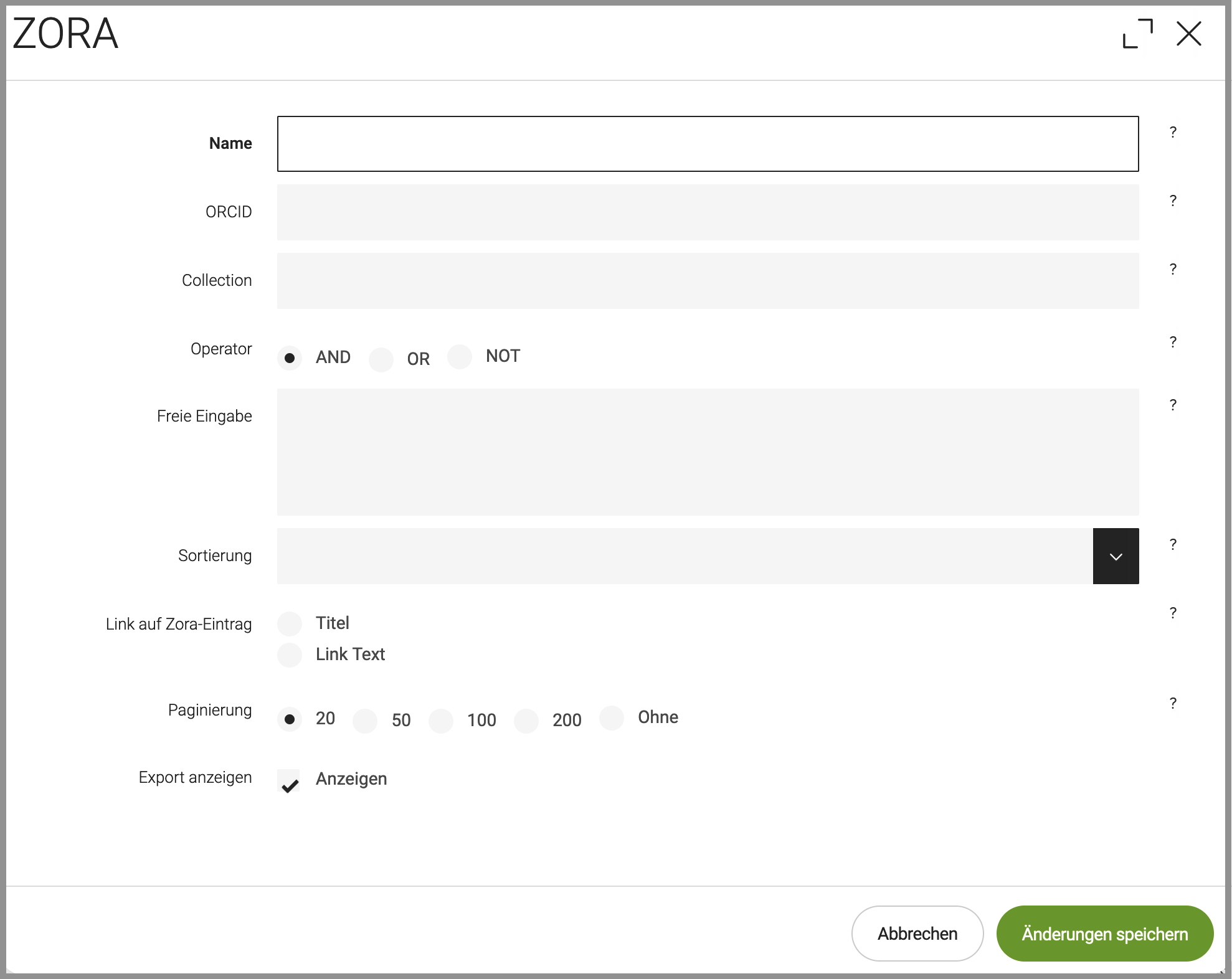
You can search for publications by the name or the ORCID (see box below) of an author. (Entering both fields at the same time does not make sense.) For "Name", enter the name exactly as it is given in ZORA (as a rule, this is "Surname, Initial". Ex: Einstein, A). You will find the list of authors in ZORA under Creators/Editors.
Alternatively, you can display all publications in a ZORA collection (see box below). These two search options can also be combined. In this case, the result sets are AND-linked: The search setting "Name: Gapp ” alone result to eleven results, but in combination with the "Collection" 10242 only nine.
In the Collection field, you can still use the old (5-digit) Collection ID as well as the new UUID of the collection.
Free input
The “Free input” (Freie Eingabe) is combined with the input in the first three fields. (However, only one of these fields may be filled in!) Select the appropriate combination operator. (If “OR” is selected, the first three fields may also be left blank).
The ZORA fields must be addressed in the specific notation described below. Please note the changes that have resulted from the migration from ZORA to DSpace on Sept. 25:
- (Author) AU=Grapp,Frederik (no space between surname and first name!)
- (ORCID) ORCID=0000-0002-0118-031X
- (Collection) The Collection ID is now characters long.
- Example: CC=accd1827-bb22-4ddd-a46a-9dbd19f402e4
- Previously, the ID was 5 characters long. It still works because it references the new ID in Zora.
- Example of old Collection ID: CC=10039
- (DSpace-Id) DPID=87f0d1da-f545-4e00-ba2f-ea356165295a
- (Publisher/Editor) ED=Horn,Anita (no space between surname and first name!)
- (Type) TY=article (other types: book_section, conference_item, monograph, dissertation, habilitation, newspaper_article, edited_scientific_work, working_paper, published_research_report, scientific_publication_in_electronic_form)
- (Subtype) STY=original (or else: STY=further)
- (Publication Year) PY=2016 (Format: YYYY, -YYYY (to), YYYY- (from) or YYYY-YYYY)
- (Chair/Subject) CS=sSinologie0 (or: CS=cBehr0)
- Keyword) KW=infection
Multiple inputs are possible. Each of them must be in a separate line. Inputs for the same attribute contribute cumulatively to the result. Inputs for different attributes are AND-linked (this is made clear in the Complex scenarios).
The DSpace ID is the UUID of a publication. You can find it in the URL of the individual record when you call up this publication in ZORA (compare it with the DSpace ID above):
https://www.zora.uzh.ch/entities/publication/87f0d1da-f545-4e00-ba2f-ea356165295a
The remaining settings concern the display of the results list. They are largely self-explanatory. Sorting also provides a clearer display of the search result.
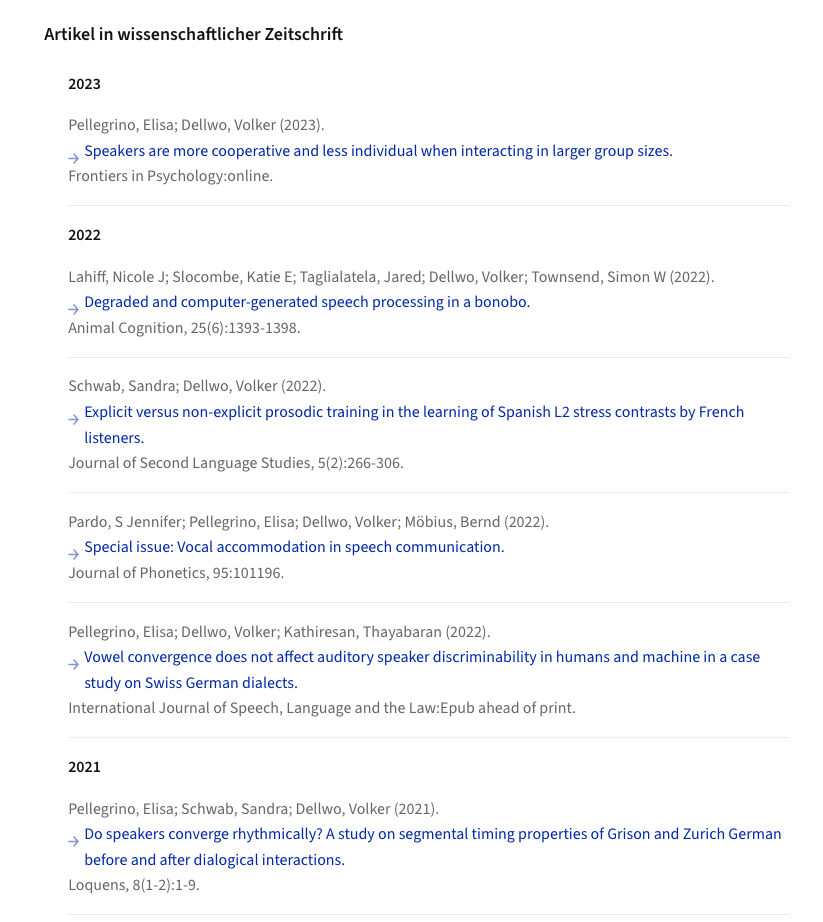
"Link text" moves the link to the end of the citations. By default, the publication titles link to the ZORA record.
Complex scenarios and FAQs
How to handle "too many results"?
The ZORA plugin can handle a maximum of 1,000 search results. If this limit is exceeded, the message 'too many results' will be displayed. For some collections there are many thousands of records in ZORA. In this case, the query should be limited to the last two years:
Collection: 509a9f9e-ab6f-4649-82da-0212f0074e80
Operator: AND
Free input: PY=2016-2017
All publications and editorships of an author
The ZORA component returns the corresponding hits via the field "name".
However, the list may contain unwanted records. For example, book chapters by other authors may appear here that were published in the edited work of the editor searched for. These records can be filtered out using the NOT operator and the field "free input" (each input in a separate line)
Name: Glauser, Wilhelm
Operator: NOT
Free input:
- AU=Antonini,Kurt (no space between name and first name!)
- AU=Bählinger,Christoph
- AU=Bickel,Simone
Such a scenario would also raise various new problems, such as the list of unwanted authors becoming very long and the query having to be updated manually more often. On the other hand, it has not yet been possible to build such a ZORA query into our websites.
Several search values in the field "free input" (same attribute)
Several search values can be entered in the field "free input" (each in a separate line!). The result from the first three input fields is linked to the combined result from the field "free input":
ORCID-iD: 0000-0002-8494-6025
Operator: NOT
Free input:
- KW=HIV
- KW=infection
- KW=drug
- KW=hepatitis
As all inputs in field "free input" refer to the same attribute KW, they cumulatively contribute to the result.
Several search values in the field "free input" (different attributes)
Several search values can be entered in the field "free input" (each in a separate line!). The result from the first three input fields is linked to the combined result from the field "free input":
ORCID-iD: 0000-0002-8494-6025
Operator: AND
Free input:
- TY=book_section
PY=2015
Here the inputs refer to different attributes. The individual lines of the "free input" are AND-linked.
Further example for multiple search values
As above, the result from the first three input fields is combined with the combined result from the field "free input":
Collection: 509a9f9e-ab6f-4649-82da-0212f0074e80
Operator: AND
Free input:
- CS=Software
- CS=Evolution
- CS=Architecture
- CS=Lab
Show individual publications (DPID)
Individual publications can be displayed. To do this, leave the name, ORCID and collection fields empty and enter the DPID in the field "free input":
Name: null
Operator: OR
Free input:
- DPID=87f0d1da-f545-4e00-ba2f-ea356165295a
- DPID=...
These inputs cumulatively contribute to the "free input" result.
Simple publication list
ZORA Publication List
Download Options
Publications
-
Stephen C. Levinson: A Grammar of Yélî Dnye: The Papuan language of Rossel Island Linguistic Typology, 29, 221–229. https://doi.org/10.1515/lingty-2024-0075
-
Children Learn Causatives Despite Pervasive Ellipsis: Evidence from Turkish Journal of Child Language, 1–22. https://doi.org/10.1017/S0305000925000200
-
The diachrony of verbal classification: Classifier mergers and semantic incoherence in Southern and Western Daly Diachronica, 42:2, 161–197. https://doi.org/10.1075/dia.24036.man
-
Central Pame verbal inflection: Morphological classification across layers Studies in Language, 49, 412–455. https://doi.org/10.1075/sl.24032.her
-
Children Find Others’ Misfortune Funnier Than Adults Social Development, 34, e12805. https://doi.org/10.1111/sode.12805
-
On feature representations for marmoset vocal communication analysis Bioacoustics, 34, 355–369. https://doi.org/10.1080/09524622.2025.2487688
-
Stimulus type and social context are stronger than individual differences in common marmosets’ novelty exploration. Animal Behaviour, 223, 123183. https://doi.org/10.1016/j.anbehav.2025.123183
-
Predictive coding and dimension-selective attention enhance the lateralization of spoken language processing Neuroscience and Biobehavioral Reviews, 172, 106111. https://doi.org/10.1016/j.neubiorev.2025.106111
-
Children Learn Best From Their Peers: The Crucial Role of Input From Other Children in Language Development Open Mind, 9, 665–676. https://doi.org/10.1162/opmi_a_00198
-
Spontaneous Encoding of Event Roles in Hominids Open Mind, 9, 559–575. https://doi.org/10.1162/opmi_a_00202
-
Corrigenda ad Rig-Veda. Das heilige Wissen. Bd. 2: fünfter Liederkreis https://archive.org/details/corrigendaRV5
-
Extensive compositionality in the vocal system of bonobos Science, 388, 104–108. https://doi.org/10.1126/science.adv1170
-
Paradigmatic complexity metrics as signals of phylogenetic relatedness Diachronica, 42, 1–46. https://doi.org/10.1075/dia.23004.her
-
Ordered transexponential fields Annals of Pure and Applied Logic, 176, 103541. https://doi.org/10.1016/j.apal.2024.103541
-
A Simple Explanation for Harmonic Word Order Cognitive Science, 49, e70056. https://doi.org/10.1111/cogs.70056
-
Asymmetric Sampling in Time: Evidence and perspectives Neuroscience and Biobehavioral Reviews, 171, 106082. https://doi.org/10.1016/j.neubiorev.2025.106082
-
A corpus approach to orthographic chunking: near-naive word separation in Swiss German text messages Corpus Linguistics and Linguistic Theory, 1–30. https://doi.org/10.1515/cllt-2024-0049
-
Bringing psycholinguistics to the field: experiences from Solomon Islands Language Documentation & Conservation, 19, 99–119. https://hdl.handle.net/10125/74816
-
VeLeRo: an inflected verbal lexicon of standard Romanian and a quantitative analysis of morphological predictability Language Resources and Evaluation, 59, 621–637. https://doi.org/10.1007/s10579-024-09721-3
-
Negation in first language acquisition: Universal or language-specific? Cognitive Science, 49, e70044. https://doi.org/10.1111/cogs.70044