Search
Table of contents
Introduction
ZORA offers a powerful standard search and an explorative advanced search with predefined fields. In most cases, the standard search will provide the best results.
ZORA uses Solr as its search engine. Terms entered are reduced to their stem. Stop words (insignificant words) are filtered. Searches are made in the PDF full text, in the bibliographic information (authors/editors, year, title, journal title), in the abstract and in other fields.
Entering search terms
Enter one or more search terms into the search slot. Example: "Protein". For several entered terms the Boolean AND operation is used automatically. Example: "Protein losing nephropathies".
As you enter the search term, autocompletion is activated from the 3rd character onwards, which provides you with the best possible result suggestions; only the title is displayed in the suggestion list. In the title display you will see the search terms highlighted, but there may also be hits in the abstract, full text or metadata, which is why no highlighting is visible in the suggestion list. Pressing the Enter key or clicking the "Search" button starts the search. If you click on one of the items in the suggestion list, a search for all terms of the selected title is initiated.
You can always get to standard search by clicking on the magnifier icon in the top right corner.
Filters
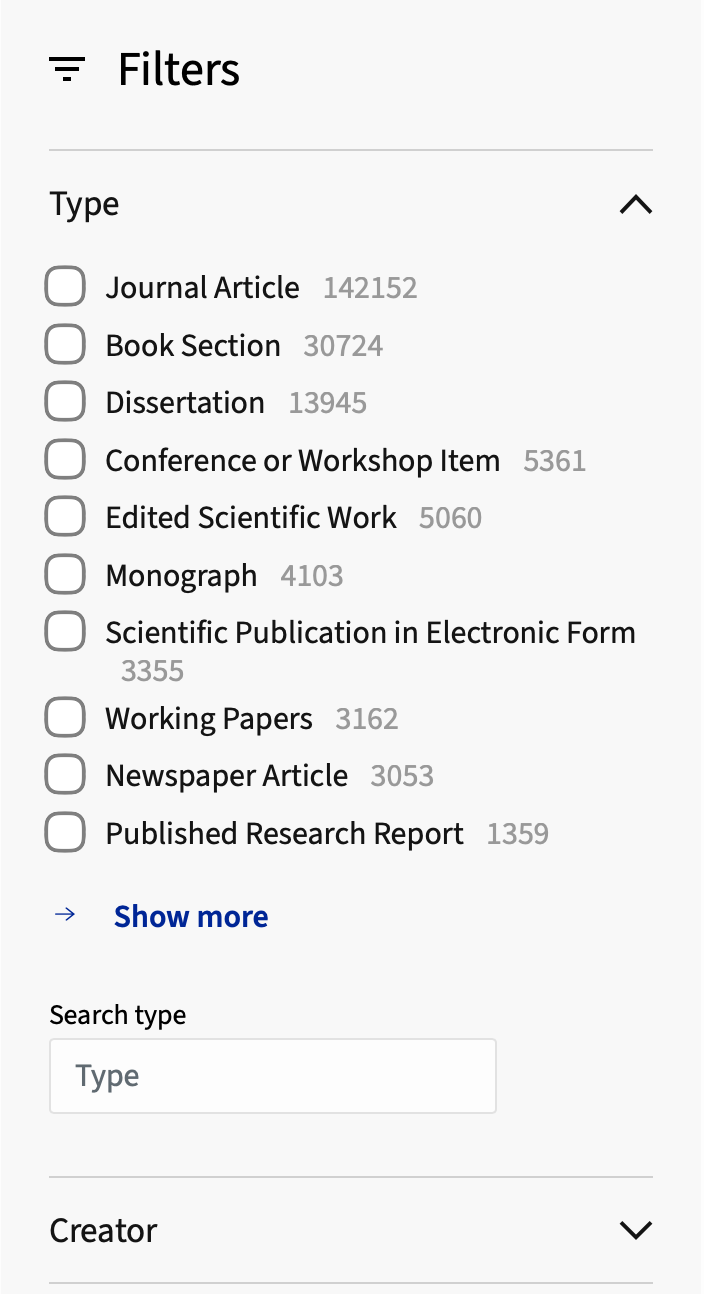
Filters help to refine the search result by selecting specific metadata.The following filters are offered for publication items: Date, Author, Editor, Examiner, Type, Has Files, Access Rights, Journal/Series, Publisher, DDC, Scopus Subject, Keyword, Language, Affiliation, and Item Type. Expand a filter to see and select its values. Each selected filter value leads to a new search query with just this filter criterion. The expected number of hits is displayed next to the individual filter criterion.
Results and status bar
The status bar allows you to sort the displayed results, export the results of the search or set the length of the results list to 10, 50 or 100 hits per page.
For each hit, the metadata, the Open Access status and, if applicable, a PDF preview are displayed. In addition, text excerpts from abstract and full text are displayed. Full text excerpts from locked PDFs are only displayed with UZH login. Matching search terms are highlighted.
Note: Formula representations can be displayed if the author has marked them accordingly in the publication (LaTeX notation / Mathjax). Example:annihilation decay mode.
Searching in Communities & Collections
All publications are assigned to at least one collection, which is part of the Communities and collections tree in ZORA. If you want to limit your search to a specificy community or collection, click on "Search in All Collections" above the search bar. A pop-up window opens in which you can search for a specific community. Click then on the desired community and the result list will be limited to it.
Search Operators
Search terms can be combined with the following Boolean operators:
| Operator | Description | Examples |
|---|---|---|
| AND | default, can be omitted | Blut AND Blood |
| OR | Blut OR Blood | |
| NOT | Blut NOT Blood | |
| () | Combination and brackets | Protein AND (Blut OR Blood) |
Phrase Search
Terms in quotation marks are searched for, as much as possible, exactly as they are written and in the order in which they appear.
Example: "fire salamander"
Since the search engine reduces the terms to their word stems, inflected forms of the terms are also found: "fire salamanders"
Wildcards
| Wildcard | Meaning | Examples |
|---|---|---|
| * | 0 oder more characters | pro*in |
| ? | exactly one character | prot?in, pro??in |
Fields
Individual fiels can be searched directly. This way, very precise and powerful queries can be formulated. The general syntax is {Field Label}:{value}. If the value includes multiple words, enclose them in double-quotes (order of terms is important) or brackets (order of terms is not important).
Example: dc.title:(genetic diversity) finds publications with the words genetic and diversity anywhere in their title.
Example: dc.title:"genetic diversity" finds publications with the words "genetic diversity" anywhere in title, but exactly written in this order.
The table below lists the most important field labels. Labels and descriptions of all fields can be found in the Metadata Application Profile.
| Field Label | Meaning | Examples |
|---|---|---|
| dc.description.abstract | Abstract | dc.description.abstract:Protein |
| uzh.contributor.affiliation | Affiliation | uzh.contributor.affiliation:"University of Zurich" |
| uzh.contributor.author | Author Use "lastname, firstname" for more precise searches. |
uzh.contributor.author:Schmid uzh.contributor.author:"Schmid, Barbara" |
| dcterms.bibliographicCitation.booktitle | Book title (title of the series/book, used for type "book section") | dcterms.bibliographicCitation.booktitle:Kommunikationsforschung |
| uzh.workflow.chairSubject | Chair Subject (free, internal keywords, e.g. for classifying research groups) | uzh.workflow.chairSubject:cBehr0 |
| dc.subject.ddc | DDC (Dewey Decimal Classification) | dc.subject.ddc:"570 Lebenswissenschaften; Biologie" |
| dc.identifier.doi | Digital Object Identifier (DOI) | dc.identifier.doi:10.1096/fj.01-0496fje |
| uzh.contributor.editor | Editor Use "lastname, firstname" for more precise searches. |
uzh.contributor.editor:Linder uzh.contributor.editor:"Linder, Nikolaus" |
| uzhWorkflowEprintid | Old ZORA-Eprint-ID (single or range) | uzhWorkflowEprintid:10000 |
| [] = inclusive, {} = exclusive, {], [} = mix | uzhWorkflowEprintid:[10000 TO 12000] uzhWorkflowEprintid:{10000 TO 12000] uzhWorkflowEprintid:[10000 TO 12000} |
|
| uzh.contributor.examiner | Examiner Use "lastname, firstname" for more precise searches. |
uzh.contributor.examiner:Stöckle uzh.contributor.examiner:"Stöckle, U" |
| dcterms.bibliographicCitation.number | Issue number | dcterms.bibliographicCitation.number:123 |
| dc.identifier.isbn | ISBN: International Standard Book Number | dc.identifier.isbn:(978-3-658-03304-0) |
| dc.identifier.issn | ISSN: International Standard Serial Number | dc.identifier.issn:(0925-2738) |
| dcterms.bibliographicCitation.journaltitle | Journal title | dcterms.bibliographicCitation.journaltitle:"BMC Microbiology" |
| dc.subject | Keyword | dc.subject:protein |
| uzh.oastatus.zora | Open Access type (green, gold, hybrid, closed) | uzh.oastatus.zora:green |
| orcid | ORCID ID | orcid:(0000-0002-9796-8821) |
| cris.virtual.orcid | ORCID ID (in the researcher profile) | cris.virtual.orcid:0000-0002-9796-8821 |
| dcterms.bibliographicCitation.pagestart | Page (Start) | dcterms.bibliographicCitation.pagestart:100 |
| dcterms.bibliographicCitation.originalpublishername | Publisher | dcterms.bibliographicCitation.originalpublishername:"BioMed Central" |
| dcterms.bibliographicCitation.pmid | PubMed ID | dcterms.bibliographicCitation.pmid:12097144 |
| dateIssued.year | Year of publication (single or range) | dateIssued.year:2024 |
| [] = inclusive, {} = exclusive, {],[} = mix | dateIssued.year:[2015 TO 2017] dateIssued.year:{2015 TO 2017] dateIssued.year:[2015 TO 2017} |
|
| uzh.scopus.subjects | Scopus classification | uzh.scopus.subjects:"Molecular Biology" |
| uzh.publication.seriesTitle | Series title | uzh.publication.seriesTitle:"Beiträge des Instituts für Rechnungswesen und Controlling" |
| dc.title | Title | dc.title:"Proteine und Vitamine" |
| dc.type | Type (article, book_section, conference_item, dissertation, edited_scientific_work, habilitation, masters_thesis, monograph, newspaper_article, published_research_report, scientific_publication_in_electronic_form, working_paper) | dc.type:working_paper |
| search.resourceid | UUID of an item | search.resourceid:(f492c2a9-d331-4107-a141-5657d0d3e08e) |
| dcterms.bibliographicCitation.volume | Volume | dcterms.bibliographicCitation.volume:100 |
Some search examples
| Query | Meaning |
|---|---|
| uzh.contributor.author:Miller AND dateIssued.year:[2010 TO 2019] | All publications with author name Miller and publication year from 2010 - 2019 |
| dc.title:(protein regulation) AND dateIssued.year:[2015 TO 2017] | All publications which have the words protein and regulation (or derived forms) in their title and which have publication year from 2015 - 2017. |
| dcterms.bibliographicCitation.journaltitle:Frontiers* | All publication which have the word "Frontiers" in its journal title. |
Advanced Search
With Advanced Search, you can build your search by combining lines of queries with the Boolean operators AND, OR or NOT. For each line, you can choose from a list of predefined fields: Title, Date issued, ORCID, Publisher DOI/PMID, Publisher, ISSN or ISBN, Book Title or Newspaper Title, Series Title, Chair Subject, Scope, or ID. In the value field, enter a term or value that must be matched. Wildcards can be used in a term. More lines can be added using the button "+Add". Start the search by clicking the button "Search".
Some caveats:
The "Author" field broadly searches names of authors, editors and examiners. For exact searching, using standard search and one of the uzh.contributor.author, uzh.contributor.editor, uzh.contributor.examiner fields, see Fields.
The ORCID field only searches researcher profiles. If you want to search more broadly, use standard search and field orcid (see Fields for an example). For the ID field, the uuid of the item must be specified. Example: f492c2a9-d331-4107-a141-5657d0d3e08e.
Browse
Browse can be accessed using the Advanced Search or the menu item "Browse." Items can be browsed using seven different indexes:
- Authors: Type a few letters in the filter field to filter author names and hit the Enter key. Example: Jäncke
- Titles: Type a few letters in the filter field and Hit Enter. Searches for titles of publications, journals, and publishers.
- Type
- Date issued: Enter a publication year in the Filter by results field.
- Subject: Browse by keywords.
- Dewey Decimal Classification
- Scopus Classification